Hi readers,
I am going to tell that how can you root your device in few simple steps so let's start it...
Well, rooting an Android phone simply means to gain administrative privileges (or root access if you are from a Linux background) on the system. When you buy a new Android phone, you are just a guest user on the phone. You can use the phone, just as a guest would use Windows, but you will not be able to make any changes to the system files.
However, after you have a root access over your phone, you could browse your Android root folder and make any changes to the system files on your phone. And that’d mean the ability to make all kinds of changes and install more powerful apps that you can’t use on a non-rooted phone.
First of all we should talk about Benefits and Disadvantages
Benefits of Root :-
After you have rooted your phone, you can run special applications that require root access on your phone. When compared to regular applications, root applications provide more features.
One of the main reasons I rooted my phone was because I wanted to install and use custom ROMs on it.
People who have low internal memory can transfer any application from internal memory to SD card after rooting their phone. There are some applications that provide the option by default. But if you want to force move an app by creating a symlink, you must use an app that only works on a rooted phone.
So those were about the merits. Nothing’s perfect and there are certain caveats associated with rooting an Android device.
Disadvantages of Rooting Your Android
So, let’s take a look at the demerits of rooting your Android.
Not to demotivate you here, but when I tried to root my first Android phone – Samsung Galaxy S – I bricked it and it was in the service center for next 15 to 20 days. No matter how good a rooting tutorial is, it’s a daunting task and if you miss out any step or flash a corrupt zip file (that’s what happened to me) you might end up with a bricked (broken) phone.
As soon as you root your phone, you void your phone’s warranty and if anything happens to your phone even when it’s in the warranty period, the company is going to charge you for the repairs.
So my conclusion is that, it depends on you if you want to root your device then go for it but don't blame anyone it something wrong happen to your device..

So Let's start :-
For kitkat and jellybean based devices you can use kingroot app
( Download kingroot from HERE )
1- Install kingroot app and open it
2- you will see a green circle in the app
3- click on green circle
4- now stay back it will Root you device in few seconds
That it you got the Root
Now if this method don't works for you Or you have a lollypop based device then follow the below given step's
1- download latest version of kingroot v4.6
( download it HERE )
2- Install the app and open it

3- This app require a working data connection
4- After enabling the data connection click on try to Root


5- thats it it will root your device

That’s it. Now you have successfully finished rooting your Android device using KingRoot android application. For confirmation, use the Root Checker app from Google Play store to check the root privileges of your smartphone.
Thanks for reading this
If you have any questions about it comment here
For more offers and tech updates visit our site daily
You can also follow us on facebook @ HERE
I am going to tell that how can you root your device in few simple steps so let's start it...
Well, rooting an Android phone simply means to gain administrative privileges (or root access if you are from a Linux background) on the system. When you buy a new Android phone, you are just a guest user on the phone. You can use the phone, just as a guest would use Windows, but you will not be able to make any changes to the system files.
However, after you have a root access over your phone, you could browse your Android root folder and make any changes to the system files on your phone. And that’d mean the ability to make all kinds of changes and install more powerful apps that you can’t use on a non-rooted phone.
First of all we should talk about Benefits and Disadvantages
Benefits of Root :-
- Run Special Applications
After you have rooted your phone, you can run special applications that require root access on your phone. When compared to regular applications, root applications provide more features.
- Run Custom ROMs
One of the main reasons I rooted my phone was because I wanted to install and use custom ROMs on it.
- Free Internal Storage
People who have low internal memory can transfer any application from internal memory to SD card after rooting their phone. There are some applications that provide the option by default. But if you want to force move an app by creating a symlink, you must use an app that only works on a rooted phone.
So those were about the merits. Nothing’s perfect and there are certain caveats associated with rooting an Android device.
Disadvantages of Rooting Your Android
So, let’s take a look at the demerits of rooting your Android.
- Your Phone Might Get Bricked
Not to demotivate you here, but when I tried to root my first Android phone – Samsung Galaxy S – I bricked it and it was in the service center for next 15 to 20 days. No matter how good a rooting tutorial is, it’s a daunting task and if you miss out any step or flash a corrupt zip file (that’s what happened to me) you might end up with a bricked (broken) phone.
- You End up Voiding Phone’s Warranty
As soon as you root your phone, you void your phone’s warranty and if anything happens to your phone even when it’s in the warranty period, the company is going to charge you for the repairs.
So my conclusion is that, it depends on you if you want to root your device then go for it but don't blame anyone it something wrong happen to your device..
So Let's start :-
For kitkat and jellybean based devices you can use kingroot app
( Download kingroot from HERE )
1- Install kingroot app and open it
2- you will see a green circle in the app
3- click on green circle
4- now stay back it will Root you device in few seconds
That it you got the Root
Now if this method don't works for you Or you have a lollypop based device then follow the below given step's
1- download latest version of kingroot v4.6
( download it HERE )
2- Install the app and open it
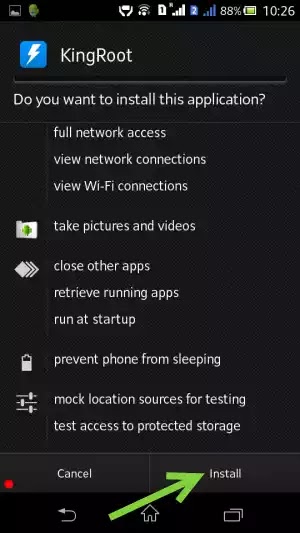
3- This app require a working data connection
4- After enabling the data connection click on try to Root


5- thats it it will root your device

That’s it. Now you have successfully finished rooting your Android device using KingRoot android application. For confirmation, use the Root Checker app from Google Play store to check the root privileges of your smartphone.
Thanks for reading this
If you have any questions about it comment here
For more offers and tech updates visit our site daily
You can also follow us on facebook @ HERE


